InDesign vs Kittl
InDesign vs Kittl
InDesign vs Kittl. Perhaps this is an unfair contest right from the start. Adobe's InDesign is a well-crafted layout program with expert features for type crafting and setting. It is my go-to program for professional layout jobs. Kittl is a graphics program available on the internet for free, though to unlock its many templates and graphic powers, a monthly ($15 for Pro users) or yearly fee ($120 for Pro users) is necessary.
Kittl (www.kittl.com), built by Tobias Saul, allows real time advanced text editing with built in text manipulation features, like shadows and easy to use text slanting, rise, text on a circle or an angle and textual distortion features. Its claim to fame is the multitude of template styles available to the user, especially the fancy vector ornament library, shapes and banners and texture collections built into the program. It is easy to use and manipulate and change elements and colors and then export your finished product to a JPG or PGN file (or PDF for Pro users) or post your creation on many social platforms. It advances WYSWYG (what-you-see-is-what-you-get) to a whole new level, and for many users — it is FREE!
Adobe InDesign, of course, is part of Adobe's Creative Cloud offerings, and available by subscription to users. The subscription price is substantial per year, but you get a number of professionally designed layout and graphical programs, like InDesign, Illustrator, Photoshop and many others. It is heralded and used by many graphical and video editing professionals worldwide, including myself. The training curve for InDesign and other such programs is also substantial, but well worth the time and effort for professional uses.
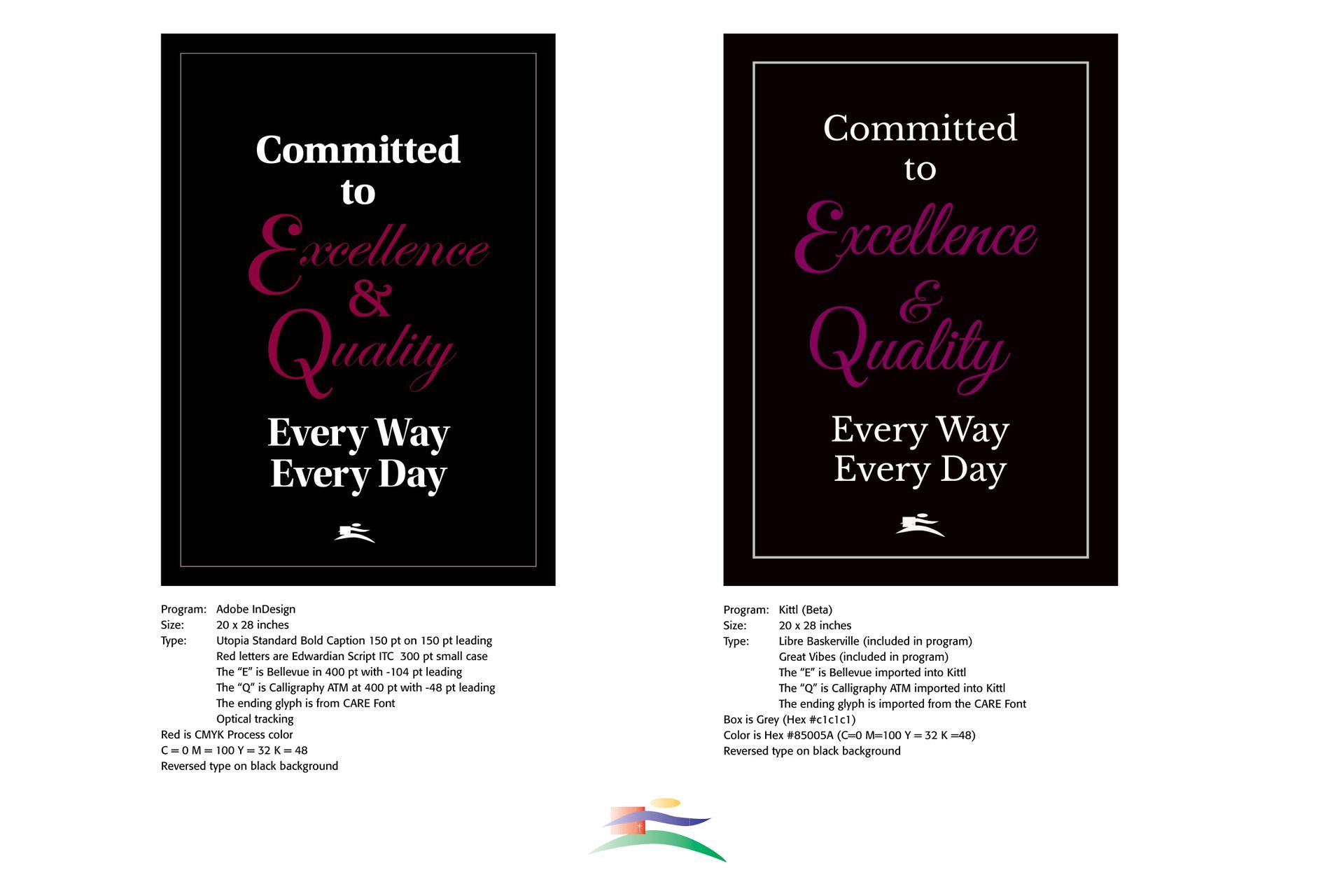
I have included a comparison of a poster I did for a client in both InDesign and then an adaptation in the Kittl program. Both look acceptable for use and possible publication, though I did not attempt to publish the Kittl design. I still like the preciseness of InDesign over Kittl, and I noted that my personal type font (CARE Font) looks grainy in the Kittl mock-up contrasted to the InDesign poster. However, for Victorian swirls and ornamentation, Kittl has many advantages over the traditional Adobe Illustrator or Photoshop programming and steps necessary.
Successful Layout & Design